Star Chaser: Building a Skateboard-Controlled Runner in Unity
Intro
Star Chaser is an embodied runner game controlled with a real skateboard. Instead of using a keyboard or gamepad, the player shifts their weight, steps off the board, and leans forward or backward to control movement in Unity.
The project began with a familiar problem from learning to skateboard: progress depends as much on confidence as it does on technique. Practising an ollie or kickflip involves a real risk of falling, and that psychological barrier can make beginners hesitate or give up before they develop basic balance and board awareness.
I wanted to explore whether a game could offer a safer entry point. Star Chaser is not intended to replace physical skateboarding. Its purpose is to let beginners practise weight distribution and balance while giving people who have never skated a playful introduction to the movement language of the sport. Within the game, difficult tricks can become achievable goals rather than immediate physical risks.
This article explains how I built the first prototype, why I selected force-sensitive resistors, how pressure readings became game commands, and what I learned from testing the system with different players.
Design Goal
The controller needed to satisfy three requirements:
- It had to recognise a small set of readable body movements: riding, jumping, and turning.
- The electronics had to remain removable so the skateboard could be modified and repaired easily.
- The sensing surface had to support an adult player without applying destructive point loads directly to the sensors.
These requirements led to a detachable module built around an ESP32 and four pressure-sensitive zones. The sensors were positioned beneath the board so that the combined readings could describe both the player’s total load and the distribution of that load between the front and rear.
Choosing a Pressure Sensor
For a production version, load cells would be the stronger choice. They are designed for weight measurement and generally provide better linearity, accuracy, repeatability, and long-term stability. Combined with an HX711 amplifier and analogue-to-digital converter, they can produce stable measurements suitable for calibration.
For this early prototype, however, I selected the FSR402 force-sensitive resistor. It is thin, inexpensive, easy to connect to an ESP32 through a voltage divider, and fast to integrate. Those qualities made it useful for testing the interaction before committing to a heavier mechanical and electronic design.
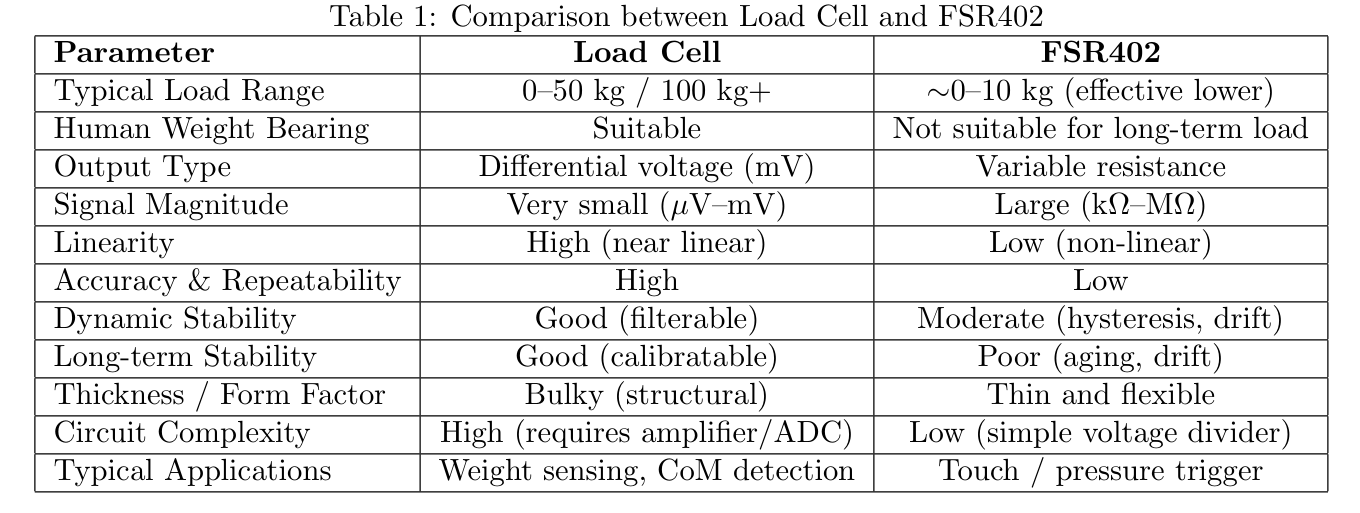
The choice involved a deliberate compromise. An FSR402 does not provide a precise linear measurement of body weight. Its response can vary with contact area, material compression, hysteresis, sensor drift, and the way force is transferred into its active region. I therefore treated it as an interaction sensor rather than a scale. The goal was not to measure kilograms accurately, but to identify stable changes in pressure that could be mapped to discrete actions.
Building the Physical Controller
I removed the skateboard’s wheels and replaced them with four supported FSR sensing modules. Each module sits beneath a rigid, laser-cut load-distribution plate. This plate spreads the player’s weight across a wider area and prevents the sensor from receiving a concentrated force that could damage it.
A softer interface material sits between the plate and the sensor. Its role is to transfer force more evenly and reduce noisy fluctuations when the player shifts position. This introduced another design variable: different soft materials compress and recover at different rates. A material that is too hard produces unstable point loading, while one that is too soft can introduce latency and make the controls feel unresponsive.
The structure therefore performs two jobs at once:
- It protects the sensing element from direct loading.
- It mechanically filters small pressure fluctuations before software processing begins.
This was an important lesson from the prototype: signal quality is not only an electronics or programming problem. Mechanical design, contact geometry, and material selection all affect the data before it reaches the microcontroller.
From Pressure Readings to Player Intent
The ESP32 reads the four sensors and groups them into front and rear pressure values. I used threshold-based classification because it was transparent, inexpensive to compute, and easy to tune during user testing.
The prototype recognises four states:
- Riding: the average total pressure rises above 2000.
- Jump: the pressure falls below 1000 after the player unloads or leaves the board.
- Turn Left: the front sensor sum rises above 2000 while the rear sensor sum remains below 1000.
- Turn Right: the rear sensor sum rises above 2000 while the front sensor sum remains below 1000.
These values are empirical thresholds derived from the prototype’s raw sensor readings. They are not universal FSR values and would need to be recalibrated if the sensor layout, voltage divider, board structure, interface material, or player population changed.
Raw Sensor Input → Interpretation Layer → Gameplay Command
The control software was structured as a small pipeline rather than sending raw ADC values directly to Unity:
- Raw input: sample the four FSR402 sensors every 10 ms.
- Interpretation: combine those readings into total, front, and rear pressure values.
- State machine: interpret each sample in the context of the previous player state.
- Gameplay command: emit a discrete serial message only when a meaningful transition occurs.
The state machine was the most important part of this experiment. A single low reading does not always mean “jump” and a high front value does not always mean “turn” The same sensor pattern has a different meaning depending on whether the player was previously off the board, riding, airborne, or recovering from a turn.
enum class PlayerState {
  NO_PLAYER,
  RIDING,
  JUMPING,
  TURN_LEFT,
  TURN_RIGHT
};

struct SensorFrame {
  int total;
  int front;
  int rear;
};

constexpr int STAND_THRESHOLD   = 2000;
constexpr int RELEASE_THRESHOLD = 1000;
constexpr int TURN_THRESHOLD    = 2000;
constexpr unsigned long ON_BOARD_CONFIRM_MS = 200;

PlayerState state = PlayerState::NO_PLAYER;
unsigned long standCandidateStartedAt = 0;

SensorFrame readSensors() {
  const int frontRight = analogRead(A0);
  const int frontLeft  = analogRead(A1);
  const int rearRight  = analogRead(A2);
  const int rearLeft   = analogRead(A3);

  return {
    (frontRight + frontLeft + rearRight + rearLeft) / 4,
    frontRight + frontLeft,
    rearRight + rearLeft
  };
}

void emitCommand(const char* command) {
  Serial.println(command); // Unity reads one discrete command per line
}

void updateState(const SensorFrame& input, unsigned long now) {
  switch (state) {
    case PlayerState::NO_PLAYER:
      if (input.total > STAND_THRESHOLD) {
        if (standCandidateStartedAt == 0) standCandidateStartedAt = now;

        // Debounce the transition: pressure must remain stable for 200 ms.
        if (now - standCandidateStartedAt >= ON_BOARD_CONFIRM_MS) {
          state = PlayerState::RIDING;
          standCandidateStartedAt = 0;
          emitCommand("RideStart");
        }
      } else {
        standCandidateStartedAt = 0;
      }
      break;

    case PlayerState::RIDING:
      if (input.total < RELEASE_THRESHOLD) {
        state = PlayerState::JUMPING;
        emitCommand("Jump");
      } else if (input.front > TURN_THRESHOLD &&
                 input.rear < RELEASE_THRESHOLD) {
        state = PlayerState::TURN_LEFT;
        emitCommand("TurnLeft");
      } else if (input.rear > TURN_THRESHOLD &&
                 input.front < RELEASE_THRESHOLD) {
        state = PlayerState::TURN_RIGHT;
        emitCommand("TurnRight");
      }
      break;

    case PlayerState::JUMPING:
    case PlayerState::TURN_LEFT:
    case PlayerState::TURN_RIGHT:
      // Transient actions return to riding after weight is centred again.
      if (input.total > STAND_THRESHOLD) {
        state = PlayerState::RIDING;
      }
      break;
  }
}
This separation made the Unity side deliberately simple. Unity did not need to understand noisy voltage ranges or sensor geometry; it only received commands such as RideStart, Jump, TurnLeft, and TurnRight. It also prevented a held pose from firing the same action every frame, because commands were tied to state transitions rather than continuous threshold checks.
Why Two Thresholds?
Using separate high and low thresholds creates a dead zone between states. Without this gap, small fluctuations near a single boundary could cause the controller to switch rapidly between actions. The dead zone makes state changes more stable and acts as a simple form of hysteresis.
Testing with players of different weights showed that fixed thresholds could support a basic demonstration, but also exposed their limitations. A lighter player and a heavier player do not occupy the same sensor range. A stronger version of the system should begin with a short calibration phase, record each player’s unloaded and standing values, and derive thresholds from that personal range.
Connecting the Controller to Unity
After classifying the current movement, the ESP32 sends a short command to Unity over a serial connection. The Unity controller maps each command to a Rigidbody operation:
Ridingapplies forward velocity.Jumpapplies an upward impulse.TurnLeftapplies rotational force in one direction.TurnRightapplies rotational force in the opposite direction.
This separation keeps the system easy to debug. The microcontroller is responsible for sensing and classifying body movement; Unity is responsible for interpreting those states as game physics. If an action behaves incorrectly, I can check whether the error came from the physical reading, the classification logic, serial communication, or the Rigidbody response.
The approach also keeps the prototype extensible. New physical gestures can be added as new serial commands without redesigning the entire Unity controller.
What Worked
The prototype demonstrated that a small number of pressure zones can create an understandable full-body control scheme. Players could quickly connect leaning with steering and unloading the board with jumping. The physical controller also made a simple runner feel more immersive because the player’s balance became part of the interaction rather than an animation triggered by a button.
The FSR402 was effective for validating this concept. Its thin form factor and simple circuit reduced the time between idea and playable test, which mattered more at this stage than measurement accuracy.
Limitations and Next Steps
The prototype also revealed several areas for improvement:
- Per-player calibration: thresholds should be normalised to each player’s resting and fully loaded readings.
- Signal filtering: a moving average or low-pass filter could reduce electrical and mechanical noise without introducing noticeable latency.
- State transitions: a finite-state machine could prevent impossible or accidental transitions, such as repeated jump signals while the player remains off the board.
- Sensor hardware: load cells would provide more reliable weight distribution data for a durable version of the controller.
- Mechanical testing: the force-distribution plates and soft interface materials need systematic comparison for durability, response time, and repeatability.
- Safety and ergonomics: a future version should include a stable base, non-slip surfaces, edge protection, and a clearly defined maximum load.
I would also separate steering strength from steering direction. Instead of emitting only a discrete left or right command, the system could send a normalised balance value between -1 and 1. Unity could then use that value to produce proportional turning, making small weight shifts feel different from aggressive leans.
Conclusion
Star Chaser began as an attempt to make the feeling of skateboarding more approachable through embodied play. The prototype showed that pressure sensing can translate weight shifts into a readable game-control vocabulary, but it also made the limitations of simple threshold logic and force-sensitive resistors very clear.
The most valuable outcome was not a finished alternative controller. It was a better understanding of how mechanical structure, sensor behaviour, signal processing, communication, and game physics must work together. In an embodied interface, the player’s body is part of the input system, so good interaction design depends on the complete physical and digital pipeline.